
Leverage the power of Zoku’s NetSuite Point Of Sale in real time, with advanced sales, inventory management, CRM integration and reporting.

Omnichannel Point Of Sale
Unified commerce made simple with advanced inventory, serialized items, seamless eCommerce, and exceptional customer and associate features-plus many more.
Leverage the power of NetSuite in real time, with advanced sales, inventory management, and CRM integration and reporting.
Centralized Inventory: Manage stock across all locations
3rd Party Integrations: With Zoku’s integration platform
eCommerce Integration: Sync online and in- store operations
Associate Tools: Enable staff for efficient service
Scalability: Flexible for growing businesses
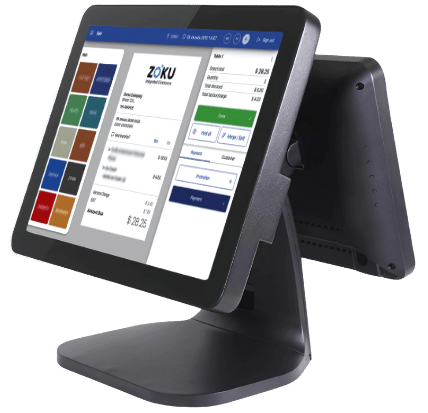
The Zoku Omnichannel POS is part of the NetSuite- powered Zoku omnichannel suite. It runs on Windows, iOS, Mac and Android, online and offline, allowing retailers to service their customers at the counter and around the store, as well as at trade shows and pop up events.
Zoku offers a multi-platform POS that works on your existing hardware, including peripherals such as receipt printers, barcode scanners and scales. The POS comes with a modern user interface that also works on state-of-the art mobile checkout devices. It allows you to achieve a very attractive TCO without any of the upfront investments associated with all-in-one solutions that result in fragmented operations. Zoku POS takes full advantage of the power of NetSuite to drive your operations without unnecessary middleware.
With ZOKU POS, everything from your inventory to your sales orders and customers are connected under the one, centralized system: NetSuite.
Evaluate POS for NetSuite in 2026. Learn how architecture, inventory management, payments, and NetSuite AI impact unified commerce across regions.
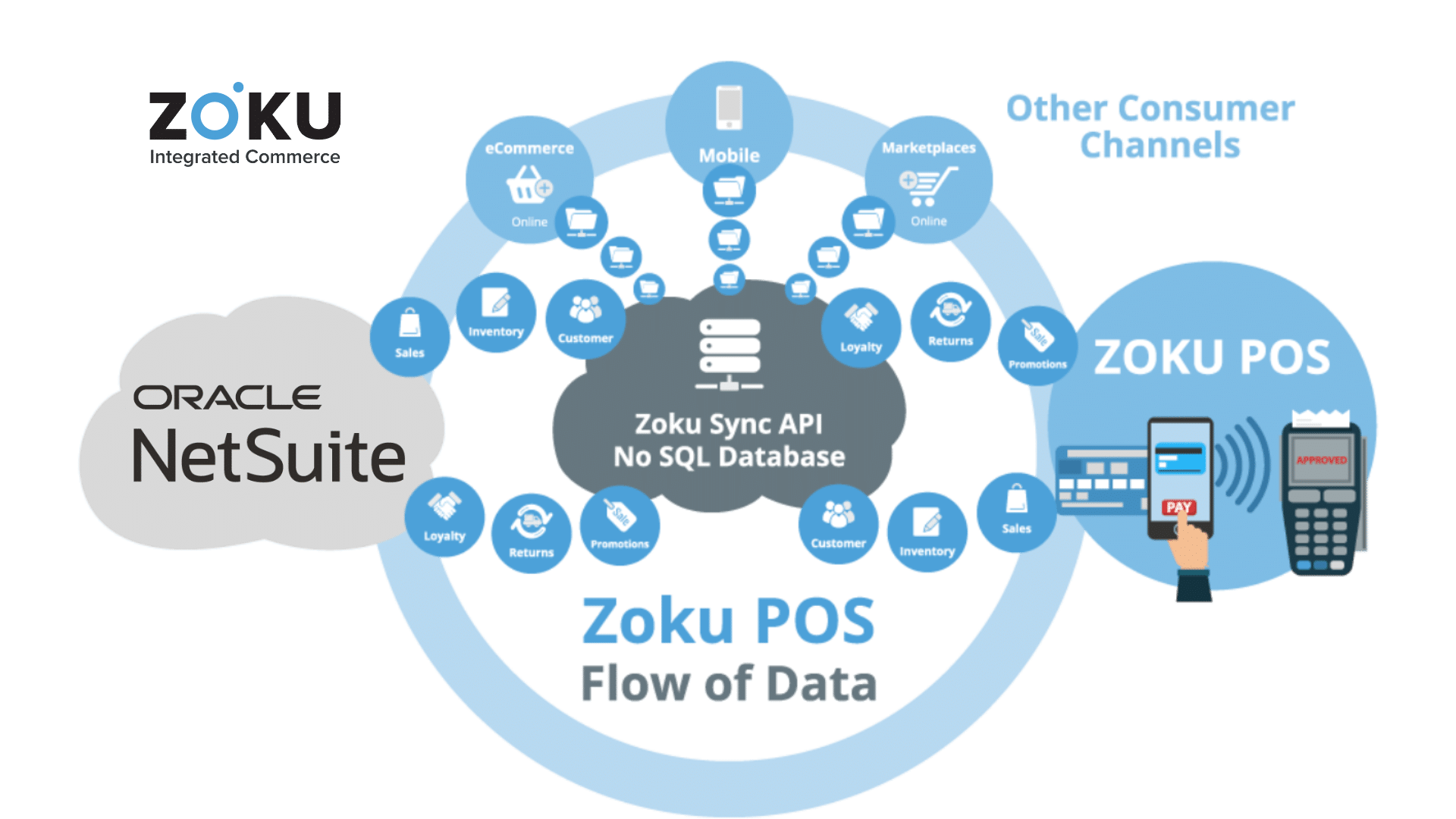
Unlike “cloud only web based” and “no database” solutions which only work when connected to the internet, with their performance depending on the quality of the network and processing speed of the back end, ZOKU works at lightning speed and can process very high transaction volumes, on and off line.
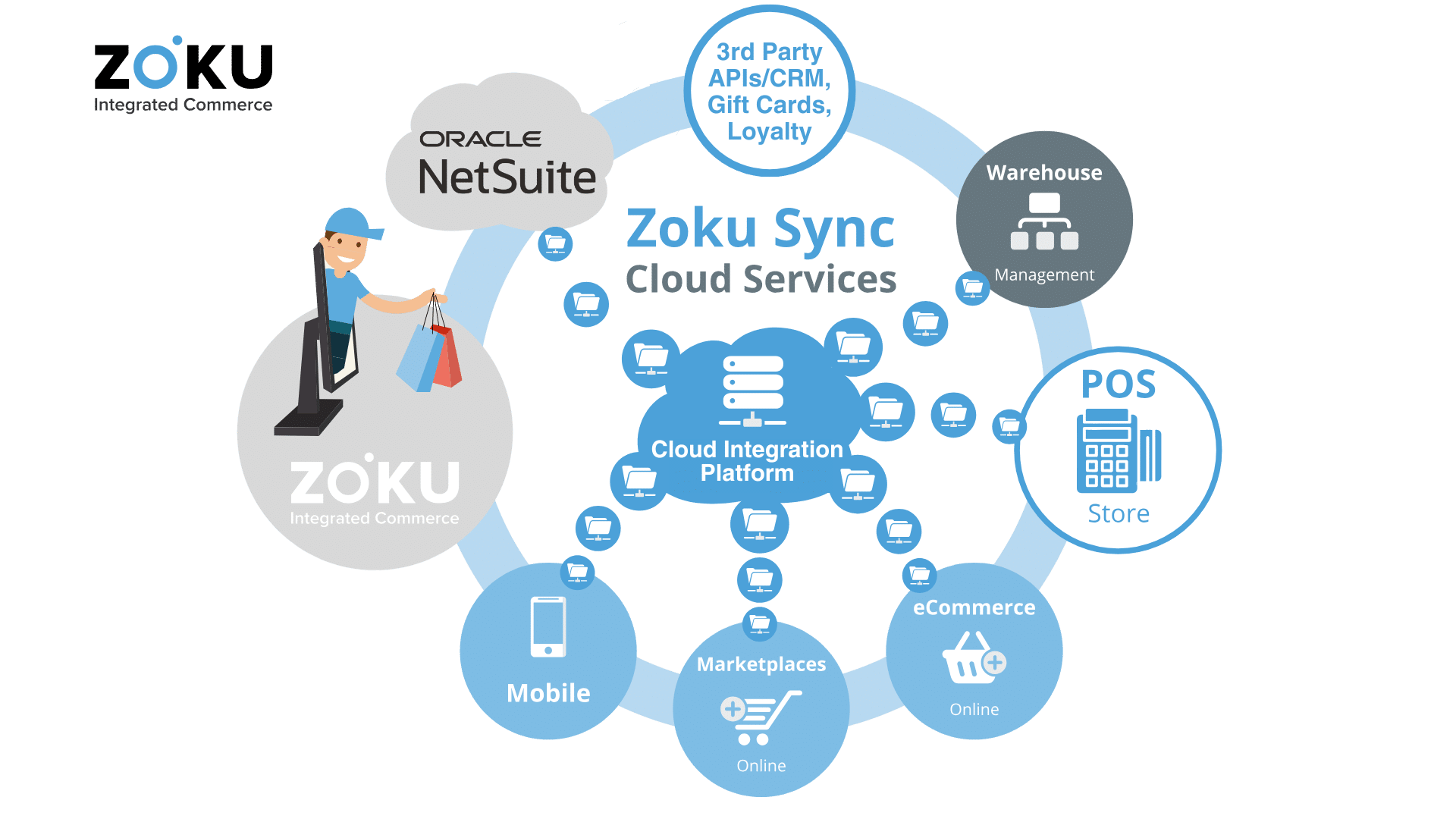
This is because it consists of a lightweight, intelligent client application running on the POS device and communicating with NetSuite via ZOKU’s Cloud based integration layer called ZOKU Sync.
Streamline your business operations
Streamline your operations with sales transactions that post directly into NetSuite, for any of your existing subsidiaries, classes, and departments. ZOKU offers completely paperless auto Accounts Payable and 3 Way Matching with the scanning of vendor bills directly processed into NetSuite.
Superior Cx
Get to know your customer base even better, as the ZOKU POS for NetSuite supports advanced Loyalty points, cash backs, coupons and promos.
ZOKU Pay
An API that allows the integration with any Payment Processor or Payment Device in any country with a simple API to API integration. This allows the ZOKU POS to be integrated with payment terminals globally, with the support of a local partner, integrator or in house developer. In addition, ZOKU has pre-built integrations with global Payment Service Providers.
B2B Features
- Sales On Account
- Customer Specific Pricing
- Sales Tax calculation based on Customer Address
True Omnichannel – By Design
Many providers loosely call their POS systems “omnichannel”. But what is really an omnichannel POS ? Clearly, one that is natively and by design integrated with all other consumer channels, back office operations, and is also designed to integrate with any internal or external service.
In ZOKU’s architecture, ZOKU’s intelligent client runs on the POS device, ZOKU Sync, a cloud based integration layer integrates the POS client in real time with NetSuite, consumer channels and essentially any service such as Marketplaces, 3PLs, Delivery Services and Payment Processors.
-
Order online, e-commerce delivery
-
Order online, pick up in-store
-
Pay in store, pick up in-store
-
Pay in store, e-commerce delivery
-
Pay in one store, pick up in another
View Stock in-hand across all locations, including warehouses, and sell items available at other locations on the spot with eCommerce delivery or store pickup options.
Process Returns and Refunds from purchases made at other locations or online.
Powerful and Intuitive UI
The POS comes with an intuitive and fully configurable User Interface for the operator and the consumer (if a consumer facing display is available).
The operator interface can optionally have a menu with categories and unlimited sub categories to add items to the sale on a touch screen, as well as barcode scanning and even product searches in a Google Like product search screen.
You can choose to display product images and information at either display, or use the consumer facing display for promotions or any other information.
The interface was designed with the best Human Factor Engineering principles for ease of use, speed, efficiency and superior User Experience.

Tired of juggling multiple systems for your different business units?
Zoku POS with NetSuite gives you a unified platform to manage retail, F&B, and B2B operations, eliminating inefficiencies and boosting your bottom line.
Zoku POS uses a single database, NetSuite, as the single source of truth.
Zoku’s Point of Sale Features





Frequently Asked Questions
POS Architecture and Scalability
How your POS is designed determines whether it scales cleanly or accumulates operational and financial debt as the business grows.
Because architecture determines where logic lives and how data flows. Poor architecture creates technical debt, duplicated inventory logic, fragmented customer records, and delayed financial impact that become increasingly expensive to fix as locations, channels, and transaction volume scale.
Point-to-point integrations move data but keep logic separate. Sales are often summarized, delayed, or transformed before reaching NetSuite, compromising data integrity. True ERP integration ensures detailed transactions, inventory movements, and financial impact are governed consistently and posted in line with enterprise rules rather than reconciled later.
Platforms like Lightspeed and Shopify POS are designed as standalone systems first. When interfaced with NetSuite, they rely on connectors that duplicate logic and introduce sync latency. As retail, food and beverage, or wholesale operations scale, these integrations accumulate operational risk, maintenance overhead, and inconsistent behavior across channels.
NetSuite-native POS systems preserve a single data model but inherit NetSuite’s performance and structural constraints. This often introduces operational latency at the point of interaction, where speed matters more than ERP screen consistency, especially in high-volume checkout and trade counter environments.
Hybrid Execution and Omni-POS Design
Modern commerce needs speed at the point of interaction without sacrificing ERP governance and financial control.
Zoku decouples execution from governance. Master data and financial controls remain aligned with NetSuite, while POS execution runs on a high-performance front end. Transactions are orchestrated back to NetSuite without forcing staff to wait for ERP-speed screen loads or processing.
Zoku is an Omni-POS because it enforces unified commerce logic across every touchpoint. In-store sales, online orders, wholesale transactions, returns, inventory transfers, and fulfillment workflows all follow the same rules and update the same NetSuite source of truth instead of operating as disconnected systems.
Devices, Hardware, and Store Operations
Store performance depends on matching the right device and hardware setup to the workload, not forcing operations into a single form factor.
No. Zoku is a cross-platform POS. It runs as an application on Windows and Linux, and as a progressive web app on Android and iOS. This allows fixed checkout stations, mobile selling on the floor, and mixed environments to coexist without forcing the business into a single device strategy.
Tablet-only POS is often a vendor deployment choice rather than an operational one. While suitable for some scenarios, forcing all workflows into tablets can limit speed, peripheral support, and endurance in high-transaction locations. Zoku supports both mobile and fixed setups so businesses can match hardware to workload rather than adapting operations to a single form factor.
Integration and Business Continuity
Integration design and execution resilience determine whether commerce keeps running when systems or connectivity are disrupted.
Modern commerce spans POS, eCommerce, inventory apps, warehouses, payments, and third-party systems. Connecting these through individual interfaces creates integration debt and data collisions. A centralized commerce integration platform allows business rules to be defined once and enforced consistently across channels as the operation grows.
Execution architecture determines whether a store stays operational or goes dark when cloud services fail. Cloud-only POS execution models such as Shopify POS or Lightspeed tie checkout directly to the vendor’s real-time availability. When upstream APIs or authentication services are unavailable, stores are often blocked from completing transactions even with staff and customers present. Zoku uses an intelligent client architecture that separates cloud-based orchestration from in-store execution. This allows stores to continue processing sales during interruptions, with transactions reconciling automatically once connectivity is restored.
Our Clients