
Choosing the Right POS for NetSuite: 2026 Evaluation Guide
 Choosing a Point of Sale for Oracle NetSuite is not a cosmetic frontend decision. It is an architectural decision that determines how sales data is captured, how inventory management operates across locations, how payment processing reconciles inside the NetSuite ERP, how order management functions across channels, and whether operations continue when networks or devices fail.
In 2026, this decision also determines whether NetSuite can act as the single source of truth for commerce data across physical and digital channels, and whether emerging NetSuite AI capabilities can operate on real-time, customer-linked signals rather than delayed summaries or not at all.
For modern retail environments, food and beverage operations, and wholesale distribution, POS sits at the intersection of stores, mobile devices, warehouses, events, and pop-ups. Choosing POS for NetSuite is therefore a back-to-front architecture decision, not a UI preference.
This guide outlines the key areas to evaluate when choosing a POS for NetSuite in 2026, the structural risks buyers often overlook, and how different architectural models hold up under real operational complexity.
POS–NetSuite Integration Models: What You Are Really Choosing
Most POS evaluations focus on features. In practice, integration architecture determines long-term scalability, data integrity, and operational confidence.
Connector-Based POS (Point-to-Point Integrations)
Connector-based POS systems integrate with NetSuite through point-to-point data exchanges. In these architectures, transactions are executed within the POS platform and persisted in its own database. Depending on the integration design, NetSuite may receive financial summaries, aggregated sales data, and inventory adjustments rather than full, line-level transactions linked to individual customers.
In many implementations, customer identification, loyalty activity, returns, and behavioral context remain native to the POS system, while NetSuite only receives partial or indirect references. This limits NetSuite’s ability to maintain a complete Customer 360, as transactions are not consistently recorded against the NetSuite Customer record at the moment of interaction.
Inventory is often updated in NetSuite through batch adjustments or periodic synchronization rather than being deducted in real time through NetSuite’s transaction processing. As a result, inventory costing, availability, and downstream workflows may diverge from what occurred at the point of sale.
These integrations focus on data transfer rather than execution. Sales data, inventory updates, payment information, and customer signals may arrive in NetSuite with delay, transformation, or aggregation. Inventory management and order management can appear functional at the store level, but reconciliation, exception handling, customer reporting, and operational visibility become routine work.
This model can be sufficient in simple retail environments. As shared inventory, cross-channel order management, centralized finance, and customer-level insight become necessary, structural limitations surface.
NetSuite Native POS (Runs Inside NetSuite)
A NetSuite Native POS is software that runs directly inside Oracle NetSuite, typically accessed through a web browser window on the POS device. In this model, the POS operates entirely within NetSuite’s application framework, data model, and execution environment.
This approach provides tight coupling between the POS and NetSuite. Transactions, customers, pricing, inventory management, and order management are recorded directly in the ERP, often in near real time. From a data consistency perspective, NetSuite remains the system of record.
However, because the POS is fully constrained by NetSuite’s architecture, this model introduces important trade-offs that become visible in real retail environments.
NetSuite Native POS solutions inherit NetSuite’s limitations around performance, offline operation, and device flexibility. High-volume transaction processing, intermittent connectivity, peripheral integration, and responsive touch-first interfaces can be challenging when execution is tied directly to the NetSuite runtime.
In addition, functional flexibility is limited by NetSuite’s data structures and scripting model. While customization is possible through SuiteScript and custom records, a NetSuite Native POS is fully coupled to NetSuite’s release cycles, governance limits, and UI constraints. As transaction volume, locations, or operational complexity increase, scalability and user experience can suffer.
NetSuite Native POS reduces integration risk but does so by trading away execution flexibility, offline resilience, and device-level performance.
Native Hybrid Architecture and Headless Commerce Readiness
From an architectural perspective, Native Hybrid POS models are built around a cloud commerce integration platform that keeps Oracle NetSuite as the single system of truth while decoupling execution across multiple commerce touchpoints. This approach aligns with the foundational principles of headless commerce by separating governance from execution without fragmenting data ownership.
In this model, transaction execution occurs at the device level through a dedicated POS application, allowing high transaction speed without direct dependency on NetSuite’s user interface or runtime environment. This ensures consistent performance in real retail environments, even under high transaction volume or intermittent connectivity, while NetSuite remains authoritative for customers, products, inventory, pricing, and orders.
Transactional outcomes, including full line-level sales data linked to customers, inventory movements deducted through NetSuite transactions, and order events, are written back into NetSuite in real time through the commerce integration platform. Unlike connector-based approaches that primarily sync data after execution, this preserves operational intent and avoids aggregation, delays, or data flattening.
Because execution is decoupled and coordinated through a cloud commerce platform, multiple commerce front ends such as point-of-sale, eCommerce, mobile apps, kiosks, events, and future channels can operate independently against the same NetSuite-governed data. This creates a practical foundation for NetSuite-powered headless and composable commerce.
To support this beyond POS, the commerce integration platform must also connect surrounding services such as CRM, loyalty, payments, gift cards, and other API-driven systems. Zoku Sync is the commerce integration platform, enabling NetSuite to integrate with these external commerce services while preserving NetSuite as the single system of truth.
Specialization vs One-Size-Fits-All POS Platforms
One-size-fits-all POS platforms such as Shopify and Lightspeed are effective retail tools when deployed as standalone systems. They provide polished front-end experiences and rapid time to value.
However, these platforms operate with their own databases, pricing engines, inventory logic, and order management workflows. NetSuite integration typically occurs through connectors that synchronize outcomes rather than intent.
As operations scale, shared inventory management, cross-channel order management, and consistent financial reporting become difficult when core logic lives outside NetSuite. Store operations may trust the POS. Finance may trust NetSuite. Reconciliation becomes the bridge between them.
This is not a feature gap. It is an architectural mismatch.
Hardware, Mobile Devices, and Operating System Strategy
Choosing POS for NetSuite also requires evaluating hardware and operating system flexibility.
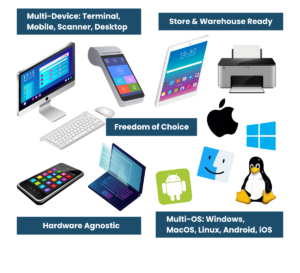
Modern retail environments require POS coverage across:
- Fixed retail terminals
- Tablets and mobile devices
- Warehouse and stockroom operations
- Events and pop-up locations
Vendor-locked hardware or operating systems constrain adaptability and increase long-term cost. A NetSuite-aligned POS should support flexible deployment across iOS, Android, and Windows while maintaining consistent sales data, inventory management, payment processing, and customer experience.
Zoku’s hardware-agnostic approach enables unified POS deployment across counter, mobile retail, warehouse, and event environments without fragmenting operational data.
Key Operational Areas to Evaluate When Choosing POS for NetSuite
Inventory Management Across Retail Environments
Inventory management is one of the most common failure points in POS–NetSuite implementations. A POS for NetSuite must support real-time inventory management across stores, warehouses, and other retail environments without relying on delayed synchronization or duplicated stock records.
Zoku extends NetSuite inventory management into stores through its Inventory Management module, a tool built for store associates to perform inventory operations at their fingertips without accessing NetSuite directly. This ensures in-store inventory operations, including counts, adjustments, and transfers, flow directly into NetSuite without duplication or data flattening.
Payment Processing, Payment Methods, and Reconciliation
In a NetSuite POS environment, payment execution occurs between the POS, the payment device, and the payment processor. NetSuite does not execute the payment itself. Instead, NetSuite governs how payments are recorded, posted, and reconciled through its payment method framework.
NetSuite payment methods define how transactions write into accounts, how funds are grouped or deposited, and how settlement and refunds are handled. When POS transactions are created with NetSuite-aligned payment methods, sales data, inventory deduction, and financial posting remain synchronized and traceable inside the ERP.
Many POS vendors restrict customers to their own payment processors and approved terminals. While this simplifies deployment, it often increases long-term cost through fixed pricing, limited rate negotiation, and constrained hardware choice. As transaction volume grows, payment rates and processing fees become a significant operating cost.
When payments are processed externally and NetSuite is updated later with summarized results, timing differences between sales, inventory updates, and settlement commonly appear. This increases reconciliation effort, particularly across multiple retail environments, locations, and payment types.
Architectures that allow flexibility in payment processors and terminals, while recording transactions in NetSuite using consistent payment methods, give businesses the ability to optimize for cost, negotiate better rates, and avoid vendor lock-in without sacrificing financial accuracy. Zoku supports this approach by enabling multiple processors and devices while keeping NetSuite as the system of record for sales data, inventory movements, and payment posting.
Order Management and Cross-Channel Sales Channels
Order management is where POS architecture is most often exposed.
Modern commerce requires order management workflows that support in-store sales, online orders, store pickup, ship-from-store, and returns across sales channels. When order management logic lives outside NetSuite, availability accuracy and fulfillment coordination degrade.
A NetSuite-aligned POS should execute order management directly against NetSuite order records so inventory, fulfillment status, and financial impact remain synchronized.
Customer Experience and Customer Loyalty
Customer experience depends on data continuity, not interface design alone.
To support meaningful customer experience and customer loyalty, POS transactions must be consistently linked to NetSuite customer records at the moment of interaction. Fragmented customer data undermines loyalty rules, promotions, and personalization across retail environments.
When customer information is governed centrally in NetSuite, businesses gain consistency across stores, channels, and devices.
Sales Data Visibility and Operational Reporting
Sales data must exist in NetSuite as operational data, not summarized outcomes.
POS systems that batch or transform sales data before syncing into NetSuite limit visibility into transaction timing, customer behavior, and inventory impact. This affects forecasting, replenishment, and operational decision-making.
When sales data flows automatically into NetSuite in real time, finance, operations, and store teams operate from the same dataset.
NetSuite AI, SuiteAgents, and POS Readiness
Oracle NetSuite is emerging as a leading enterprise platform for operational AI. By 2026, NetSuite’s AI strategy is centered on SuiteAgents, which are designed to reason over live business data and guide action across finance, inventory, and customer operations. AI is no longer positioned as a reporting layer. It is becoming part of how decisions are made in real time.
This shift fundamentally changes how POS systems must be evaluated.
SuiteAgents do not operate on summaries or batch updates. They rely on real-time, customer-linked commerce signals flowing through NetSuite. Sales line items, inventory deductions, customer interactions, pricing decisions, promotions, returns, and order events must exist inside NetSuite at the moment they occur.
When POS platforms execute transactions in their own engines and synchronize results later, NetSuite AI is structurally limited. It can analyze outcomes after the fact, but it cannot act operationally. Inventory agents cannot prevent stock-outs. Customer agents cannot intervene during a visit. Loyalty and pricing intelligence arrive too late.
POS architectures that treat NetSuite as a downstream reporting destination flatten reality before it reaches the platform. As NetSuite’s AI capabilities advance, the cost of this data loss increases.
When POS workflows operate with NetSuite as the system of truth, SuiteAgents gain visibility into live commerce activity. This enables NetSuite AI to prioritize exceptions, guide store-level actions, detect anomalies, and support customer engagement during the transaction itself, not after close.
Choosing a POS for NetSuite in 2026 is therefore inseparable from enabling NetSuite AI. The question is no longer whether a POS integrates with NetSuite, but whether it preserves the speed, granularity, and customer continuity that NetSuite’s AI requires to function as designed.
Conclusion: Choosing POS for NetSuite in 2026
Choosing the right POS for NetSuite is not about features. It is about architecture.
Integration model, specialization versus one-size-fits-all platforms, hardware and operating system strategy, inventory management, payment processing, order management, and NetSuite AI readiness all intersect at the point of sale.
Solutions that treat NetSuite as a reporting destination introduce structural risk. Solutions that treat NetSuite as the execution engine create a foundation for unified commerce, operational resilience, and AI-driven decisioning.
In 2026, POS for NetSuite is no longer a peripheral system. It is a core operational decision that shapes how the business runs.
FAQ: Choosing POS for NetSuite in 2026
The best POS for NetSuite is determined by architecture, not branding or features. POS systems that preserve real-time, line-level transactions, customer linkage, and inventory deductions inside NetSuite provide the strongest foundation for unified commerce and NetSuite AI.
Not necessarily. Many POS offerings listed as SuiteApps execute transactions in an external POS system and synchronize results into NetSuite. In these cases, NetSuite reflects transaction outcomes rather than governing the transaction lifecycle.
In connector-based architectures, transactions are typically executed and stored in the POS platform’s database. NetSuite receives sales data, inventory adjustments, and payment information through synchronization, which may be delayed, aggregated, or transformed.
No. Some integrations send summarized financial data or inventory adjustments rather than full line-level transactions linked to customers. This limits inventory accuracy, customer reporting, and operational visibility inside NetSuite.
Customer linkage is critical. NetSuite Customer 360, loyalty programs, pricing rules, and AI-driven insights depend on transactions being linked to customer records at the moment of interaction, not reconstructed after synchronization.
Yes. Inventory accuracy depends on whether inventory is deducted through NetSuite transactions in real time or updated later through synchronization. Delayed updates increase reconciliation effort and availability risk across locations and channels.
Yes. Many POS vendors restrict payment processors and terminals to their own payments ecosystem, which can increase processing costs and limit rate negotiation. Architectures that summarize payment results before updating NetSuite introduce timing differences that increase reconciliation effort.
Some POS systems support offline operation. Architectures with intelligent, device-based execution are better suited for real retail environments, allowing continued sales during connectivity disruptions with safe synchronization once connectivity is restored.
Shopify and Lightspeed can integrate with NetSuite and may be listed as SuiteApps. However, their architectures are designed to own commerce logic outside the ERP. As NetSuite becomes operationally central, this creates architectural boundaries rather than unified execution.
Yes. NetSuite AI relies on real-time, customer-linked commerce data inside the ERP. POS systems that execute transactions externally and synchronize later prevent AI from acting operationally during the transaction.
Our Clients